See Path Smoother module:
SEE Path Smoother is a software designed for applying robust smoothing on time series of an x,y coordinates in space.
Instructions for program use:
- Set the ‘Path Smoother’ as follows:
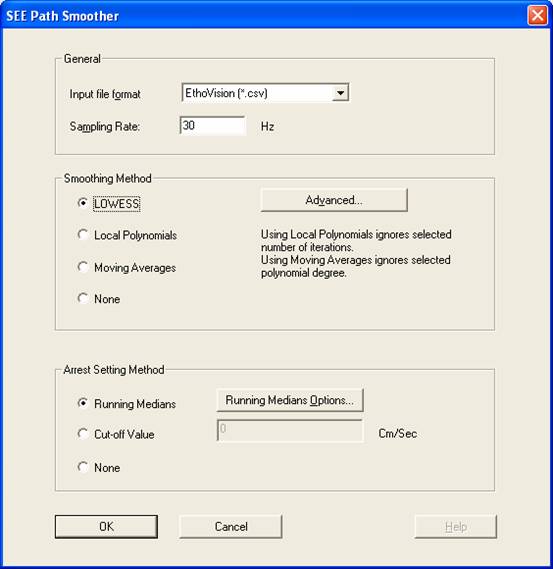
The input file/s for the See Path Smoother is “.csv” files created by EthoVision™ or “.dxy” files created by PhotoBeam AccuScan (See Overview)
- Choose the desired input File format (the default is a “.csv” file).
- Enter Sampling rate in which your data was acquired.
- Choose Smoothing method: Lowess recommended (default).
- Advanced Lowess properties:
The dialog box Advanced Lowess Properties contains the following parameters:
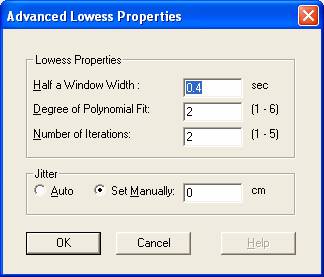
Half Window Width: This is the window for the LOWESS smoothing algorithm. The typed in default is suitable for all sampling rates and can be changed if you want a stronger (enter a higher value), or weaker (enter a lower value) smoothing.
Degree of Polynomial Fit: The degree of the Polynomial that is fitted by the LOWESS could change from 1 to 6. The recommended degree is 2. You can use, however, 1 if you want a stronger smoothing or 3-6 if you prefer weaker smoothing.
· Setting a degree of 1 will produce speeds but not accelerations.
Number of iterations: Iterations of LOWESS. The recommended value is 2.
Jitter: This method adds random oscillations to the original data, in order to improve smoothing. The amplitude can be set automatically or manually. To disable this method choose to set manually and set the amplitude to 0 (the default value).
- Arrest setting method:
We first identify complete arrests, then define the segments between arrests as motion segments (sometimes using in the software the unfortunate term "unsegments"), then calculate the maximal speed of each motion segment and plot a frequency distribution (density graph) of maximal speeds, which is finally used to establish the cutoff point between lingering episodes and progression segments.
i. The running medians method is used to recognize and retrieve the animal’s arrests (default). Other options available are:
ii. “cut-off value” option in which a desired speed value is entered manually as a threshold that all smaller speeds are treated as Arrests.
iii. “None” option which do not define arrests.
The dialog box Running Medians Options contains the following parameters:
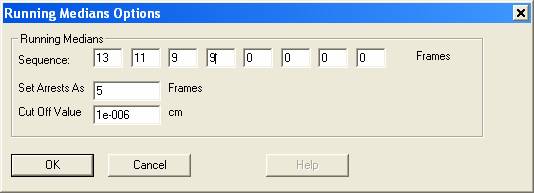
Sequence: The running median performs a few iterations with changing window sizes whose values can be specified by the user. The sequence currently used is based on our experience and on Tukey's recommendations. Reference:
o
Hen I, Sakov A, Kafkafi N, Golani
I and Benjamini Y Smoothing Techniques for the Computation of Velocities and
stops in Rodent exploratory Behavior. J. Neuroscience Methods 133 (2004) 161–172
o Tukey, J. W., 1977, Exploratory Data Analysis. Addison Wesley Publishing Company.
The sequence depends on the sampling rate. The default values are suitable for 25Hz and 30Hz sampling rates.
* A table of values of window sizes corresponding to the sampling rate used will be supplied in a later version.
Set Arrests As: The criterion for considering a sequence of data points as an arrest (stand-still stop). This is the minimal number of frames in which the animal’s location did not change. This criterion depends on the sampling rate. We use the 5 frames default for a 25 Hz sampling rate in Pal and 6 for a 30 Hz in NTSC.
* A table of values for other sampling rates will be supplied in a later version.
Cut Off Value: Determines the amount
of difference between two most distant data points within the time-window,
defined by the “Set Arrests As” option. The current value is close to zero.
When all the parameters are set, click the OK button and the Process button in the SEE Workshop window. The output file is a “.txt” file of the smoothed data and setup information file “.inf”.